Adding Grid Pagination to Standard Acumatica Screens (Classic & Modern UI)
When building custom screens in Acumatica, adding numeric page numbers to the bottom of a grid is straightforward: you simply set PagerSettings Mode="Numeric" directly within your ASPX file. However, a common challenge arises when you want to apply this same pagination behavior to original Acumatica screens.
However, if you try to apply this same pagination to original Acumatica screens, you will quickly hit a wall. Acumatica's Customization Editor does not allow you to modify PagerSettings for standard grid controls, nor does it support direct ASPX adjustments for these properties on base screens.
So, how do you enable grid pagination on standard screens when the platform locks you out of doing it through the UI editor?
- The Classic UI
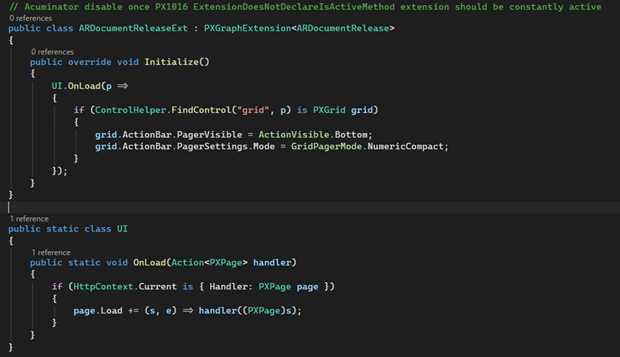
We can create a small static helper class (UI) that subscribes to the PXPage.Load event. Inside our PXGraphExtension, we override Initialize() to locate the standard grid control on page load and set its pager properties.
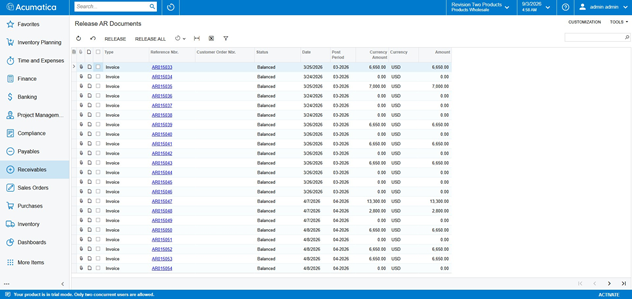
Here is how the screen looks like before the changes:
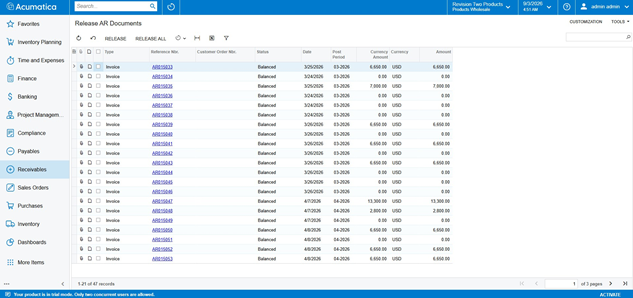
And after:
- The Modern UI Solution:
In Acumatica's Aurelia-based Modern UI, overriding standard control properties is handled through view extensions and decorators. If an original screen view lacks numeric pagination, you can extend the view in TypeScript and apply @updateDecorator to update the grid's runtime configuration.
In your TypeScript extension file for the target screen:
export interface View_Ext extends View {}
@updateDecorator("gridConfig", "pagerMode", GridPagerMode.Numeric) export class View_Ext {}
Comments are provided by Disqus, which sets its own cookies, including for advertising.