One View, Two Grids: Migrating a Classic UI Pattern to Modern UI
Introduction
One of the common challenges when migrating a customization from Classic UI to Modern UI is recreating custom tabs that display the same data as an existing grid.
In Classic UI, multiple tabs can easily reuse the same graph view. However, in Modern UI, this approach can make the customization difficult to maintain because both grids share the same collection.
Scenario
Assume you are migrating a Classic UI customization on the Sales Orders (SO301000) screen.
The customization already contains two tabs:
- Details
- Custom Details
Although they appear as two different grids, both tabs display the same sales order lines and are backed by the same graph view.
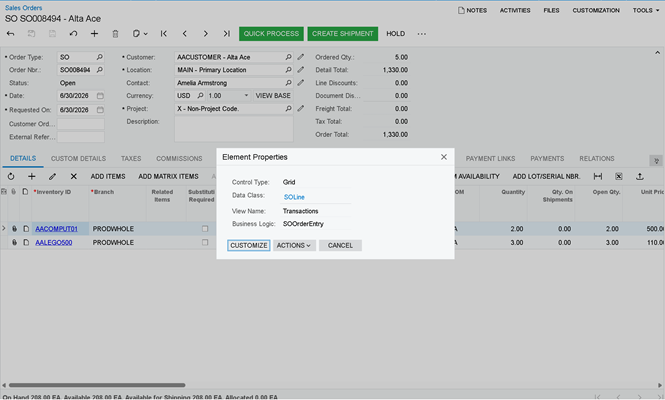
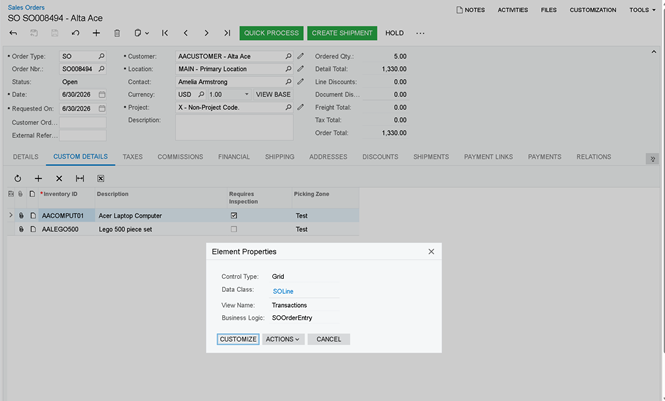
The Custom Details tab doesn't introduce a new DAC or additional business logic. It simply presents the same SOLine records using a different set of columns.
The goal is to migrate this customization to Modern UI while preserving the original behavior.
The First Attempt
Since both Classic UI grids use the same graph view, the first idea is to reuse the existing Modern UI collection.
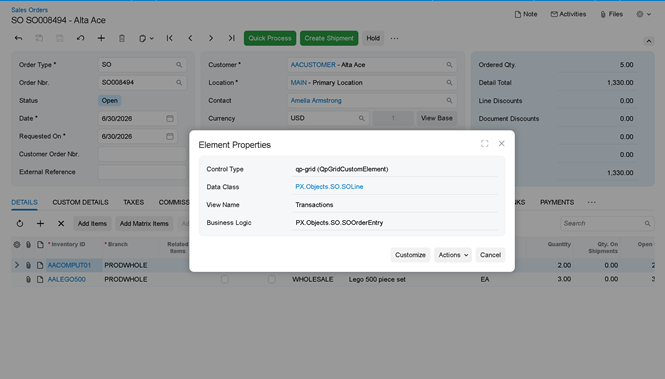
We simply extend the existing Transactions collection with the custom fields required by the Custom Details tab and bind the new grid to the same collection.
At first glance, this looks like the simplest solution.
What Can Go Wrong?
This approach introduces several issues because both Modern UI grids now share the same collection.
Depending on how the customization is implemented, you may encounter one or more of the following problems:
- The custom columns added for Custom Details also appear in the standard Details tab.
- Changes to the grid configuration affect both tabs.
- Field decorators intended for one grid are applied to both.
- In some cases, one grid may display the data correctly while the other appears empty because both tabs compete for the same Modern UI view definition.
Instead of having two independent tabs—as in Classic UI—you now have two tabs that are tightly coupled.
The Solution
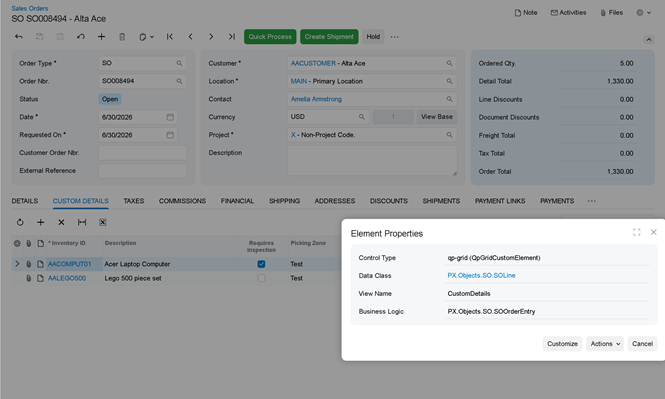
Instead of reusing the existing collection, create a second graph view that returns exactly the same records.
public PXOrderedSelect<SOOrder,SOLine,
Where<SOLine.orderType, Equal<Current<SOOrder.orderType>>,
And<SOLine.orderNbr, Equal<Current<SOOrder.orderNbr>>>>,
OrderBy<Asc<SOLine.orderType, Asc<SOLine.orderNbr, Asc<SOLine.sortOrder, Asc<SOLine.lineNbr>>>>>> CustomDetails;
Notice that nothing changes except the view name. The query, DAC, sorting, and business logic remain exactly the same. We simply expose the same records through another graph view.
Next, expose the new view as its own Modern UI collection.
TS:
During our migration, we also included the key fields from the underlying DAC in the TypeScript model. This is a good practice when exposing an existing graph view through a new Modern UI collection and can help avoid rendering issues.
HTML:
<template>
<qp-tab id="CustomDetailsTab" caption="Custom Details" after="#tab-Details">
<qp-grid id="CustomDetailsGrid" view.bind="CustomDetails"></qp-grid>
</qp-tab>
</template>
Although both grids display the same SOLine records, they should not share the same Modern UI collection.
Creating a second graph view allows each grid to evolve independently while keeping the same business logic and data source.
Comments are provided by Disqus, which sets its own cookies, including for advertising.